See the real tags on any Etsy listing
Install the free ListingSafe extension, open any listing on Etsy, and a panel shows the tags it actually uses (up to 13), with trademarked words marked in red.
Free account: 100 listings a day. Paid plans: no daily limit.
The problem
Etsy doesn't show a listing's tags on the page. The row of searches near the bottom is a different list, so copying it tells you little about what the seller actually tagged.
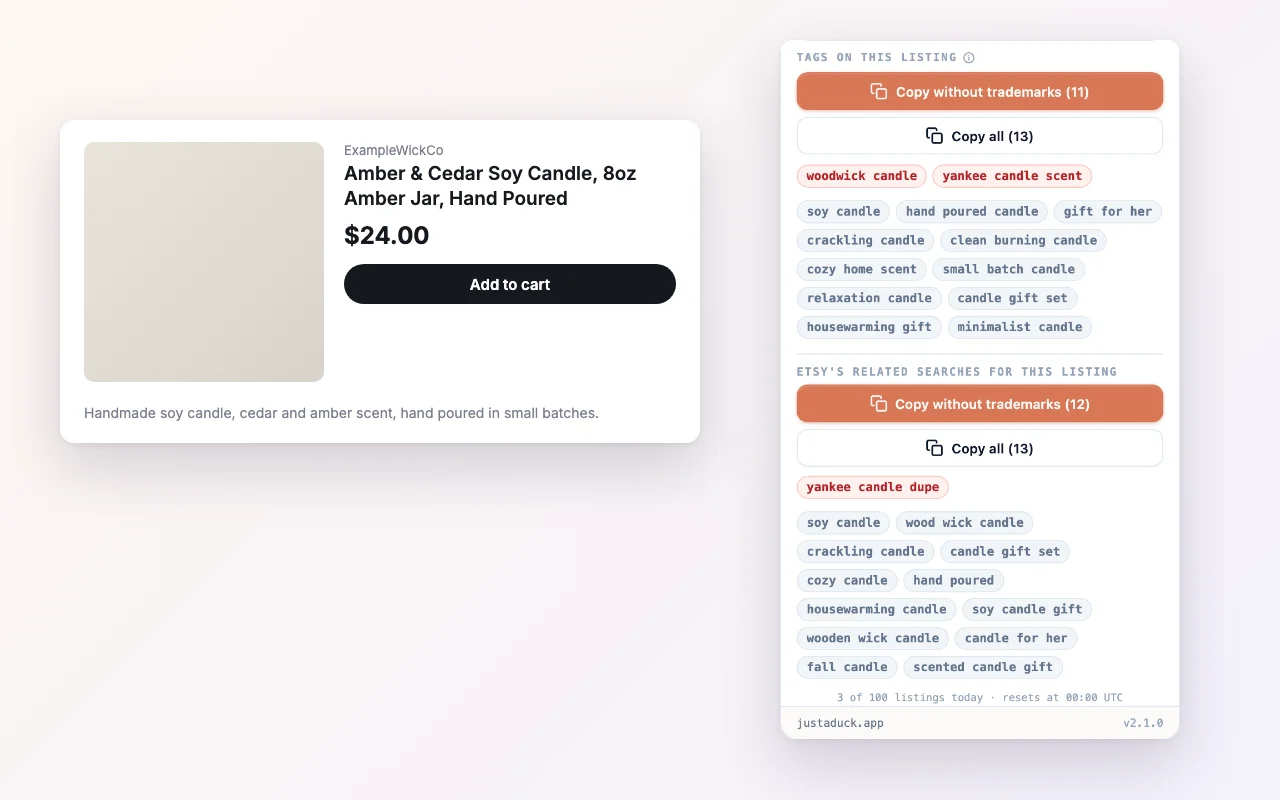
Open any listing: the tags it uses, trademarked ones in red.
What you get
Every tag it really uses.
Up to 13, read from Etsy's own listing data, not the related-search chips on the page.
Trademarked words marked red.
So you know which ones not to copy into your own listing.
The related searches Etsy shows for it.
Plus the shop's total sales, and the listing's reviews and favourites.
Copy them in one click.
With or without the trademarked ones.
Where the tags come from
They're read from Etsy's own listing data, the same tags the seller typed in, up to 13. Trademark flags come from our list of trademarked brand names, the same list our Listing Optimizer uses.
How it works
- Add the extension to Chrome or Edge.
- Sign in with a free account.
- Open any Etsy listing — the panel opens on the right.
FAQ
Where did keyword research go?
It moved into the extension. The listings Etsy shows first depend on who's searching, and that isn't in Etsy's public data, so we show you the real tags of the listing you're actually looking at instead.
Does it change anything in my Etsy shop?
No. The extension only reads the listing you're viewing. You copy what you want.
Do I need a paid plan?
No. A free account covers 100 listings a day.
Add the free extension. Then open any Etsy listing and see the tags it really uses.